


A team I worked with switched on their first MCP server on a Monday and expected the AI to be running a real business process by Friday. By Friday it was slower, more expensive, and occasionally confidently wrong. Their conclusion was that MCP was overhyped.
That sounds like a story about a technology that failed. It isn’t. It’s a story about a mental model that didn’t fit the thing it was pointed at, which is the most common and the most fixable reason these projects stall.
Most people now hear “MCP” in vendor decks without a clean picture of what it is or what it commits them to. Two questions decide it: how an AI model reaches your tools and data safely, and why so many first attempts go wrong. Everything below serves those two, with enough mechanics that your IT people recognise their own problem. Nothing in it stops short of a decision you can make or a question you can ask.
What you are actually plugging in
The Model Context Protocol is an open standard, introduced by Anthropic and open-sourced in November 2024. In December 2025 Anthropic donated it to the Agentic AI Foundation, a directed fund under the Linux Foundation co-founded with Block and OpenAI, so it is now governed as shared industry infrastructure rather than one vendor’s project. It lets an AI application connect to external tools, data, and actions through one common interface, rather than a custom integration hand-built for each tool.
The problem it solves is one every leader recognises from other integration work. Say you have several AI applications (Claude, an internal chatbot, an IDE assistant) and several systems they need to touch (GitHub, Slack, your CRM, a database). Wired by hand, that is an M×N problem: every application connected to every system, one bespoke join at a time. MCP turns it into an M+N problem: each system’s owner builds one MCP server, each AI application builds one MCP client, and they all interoperate.
The standard names three roles, and keeping them straight is most of the battle.
- Host: the AI application your people actually use: Claude Desktop, an IDE, a custom agent. It coordinates everything.
- Client: a connector living inside the host that holds one dedicated connection to one server. The host runs one client per server it talks to.
- Server: a small program that exposes one system’s capabilities (your GitHub, your database, your files) in the MCP format. It can run on the same machine or remotely.
A server offers three kinds of thing, and the official architecture docs name them plainly. Tools are actions the model can take: query a database, send an email, open a pull request. Resources are read-only data the model can pull in for context: a document, a record, a schema. Prompts are reusable templates a person picks before a task: a vetted workflow, a house style, a checklist.
The waiter. An MCP server is a waiter who presents the menu and takes the order. It never chooses the meal. The AI model in the host reads the menu and decides what to order; the server carries the request to the kitchen and brings back the result.
Underneath, for the IT reader, MCP is unglamorous by design. It uses JSON-RPC 2.0 for its messages and was modelled on the Language Server Protocol, the proven pattern that lets one editor talk to many programming languages. A server runs locally as a subprocess or remotely over HTTP with standard authentication (the specification recommends OAuth). That is the whole novelty budget: a familiar protocol pointed at a new job.
The interaction itself is short and inspectable. The host starts and creates a client per server. The client asks what the server offers and gets back names, descriptions, and input schemas. The host hands those to the model, the model picks a tool and its arguments, and the server runs the real logic and returns the result. Every governance decision in the rest of this piece sits on that one seam.
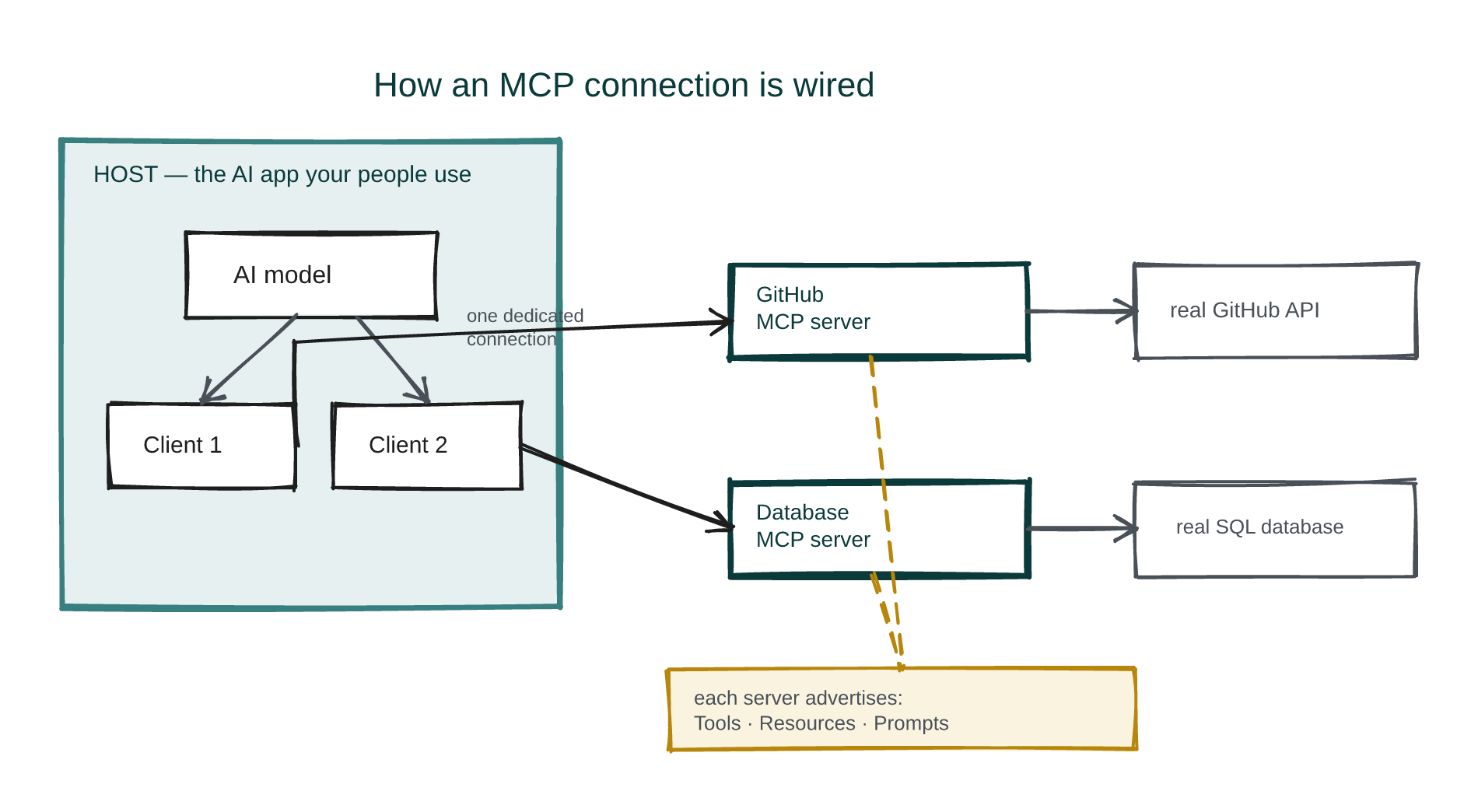 Diagram — one host, one client per server, and each server a single governed doorway into one system. The model reads what each server advertises, then decides what to call.
So is it just an API in a smarter wrapper?
Every technical reader asks this, and asking it is a sign of sound instincts. Under the hood an MCP server usually does call an ordinary REST or RPC API. The demos look like “call a tool, get a result,” which looks exactly like an HTTP request. So people map MCP onto their API mental model, and that mapping is precisely what breaks the rollout. It is the point Docker’s engineering team made under the blunt title “You Are Doing MCP Wrong”.
Here is what MCP adds on top of the API it wraps.
- Discovery. A plain API assumes the caller already knows its endpoints; an MCP server advertises its own tools, schemas, and descriptions at runtime, so a model that has never met it can find out what is on offer.
- One contract across vendors. OpenAI, Anthropic, and Google each define tool-calling differently. MCP is the single format, so a tool built once works across Claude, ChatGPT, Gemini, and more: the M+N win made real.
- The model decides when to call. A programmer scripts a plain API at a fixed point; with MCP the tool is offered to a model that chooses whether and when to use it. That is where non-deterministic reasoning meets deterministic execution.
- Descriptions written for a model to reason about. Where an API definition carries a URL and parameters, an MCP tool definition carries intent, preconditions, and what success looks like. The model needs a clean, end-to-end tool, not your whole business domain.
- More than tools. Resources, prompts, and elicitation (a structured way for a server to pause and ask a human for confirmation or a missing input) have no equivalent in a bare API. Ignoring them is the most common way teams under-use MCP.
- A defined boundary. MCP standardises where authentication sits and how the connection is made: one inspectable seam between the model and your systems instead of many.
The USB-C port. Before a universal port, every device carried its own plug and driver. MCP is the USB-C of AI tooling: one standard socket, so any compliant AI application plugs into any compliant system.
The honest read is that the sceptics have a point: a model can already call a plain API, and “just use OpenAPI” is not a foolish position. MCP’s advantage is standardisation, discovery, and model-shaped tool contracts. Say that plainly to anyone who pitches it as more.
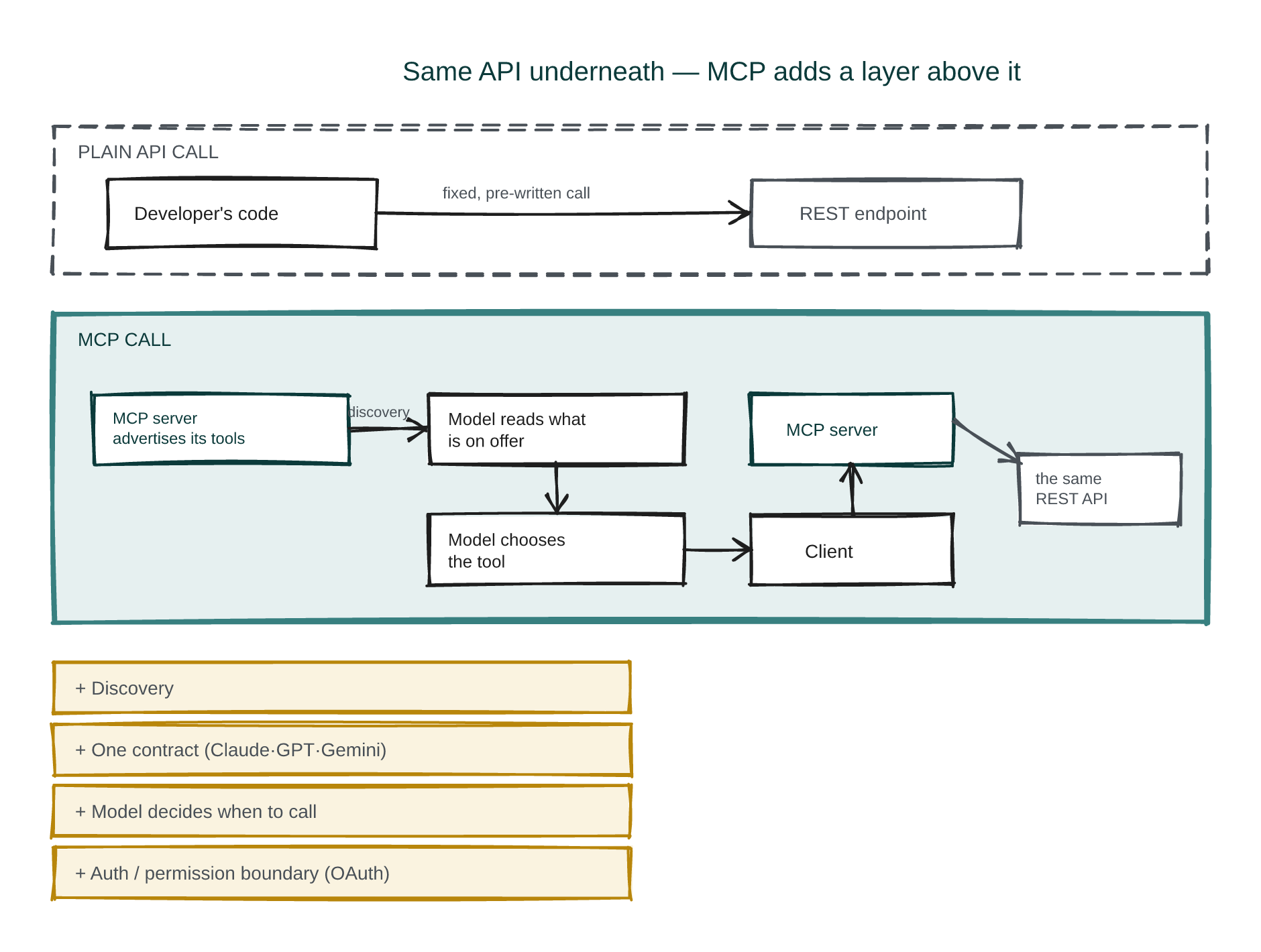 Diagram — same API at the bottom. What MCP adds sits above it: discovery, one model-facing contract across vendors, the model deciding when to call, and a single authenticated boundary.
Why your team’s attempts quietly fail
Almost every “MCP isn’t working” story I hear is one of six patterns. Each has a concrete, do-this-Monday fix.
One fact explains most of the six: MCP is a protocol, not a product. Like SMTP for email or OAuth for sign-in, it defines a common language and ships no built-in authentication, monitoring, audit trail, hosting, rate limiting, or error handling. Those are yours to add. Most failures are teams assuming the protocol handed them something it never promised.
1. Too many tools in the room. Symptom: you connect ten servers with roughly five tools each, and the AI gets slower, pricier, and less accurate. Why: every tool definition is loaded into the model’s context before it reads your request, and Anthropic’s own engineers measured what that costs: each definition runs a couple of hundred tokens, and at scale that is hundreds of thousands of tokens spent before the first word of the task. The model then wades through tools it will never use. Fix:
- Mount one server per job, and only to the agents that do that job. The marketing assistant does not need the deployment server. Scope by role, not “connect everything to everything.”
- Cap the live toolset. A useful rule of thumb: if an agent is carrying a tool it hasn’t called in a week, unmount it.
- Load tools on demand, not all at once. Anthropic’s fix for large deployments is to expose MCP servers as code the agent calls only when needed, which cut context overhead by up to 98.7% in their testing (a vendor’s own measurement on its own example workload, so read it as a direction, not a number you will hit). You don’t have to build that yourself to use the principle: keep each agent’s standing toolset small and deliberate.
2. Keys to the kingdom. Symptom: one server is granted full access to a service, or holds the tokens for email and drive and database at once, so the AI “can do anything.” Why: a single confused or compromised server now has the run of everything, and the blast radius of one mistake is enormous. An agent can delete a whole folder when one file was meant. Fix:
- One scoped credential per system, at the minimum right. A CRM token that can read contacts but not delete them. A read-only database role for anything that only needs to look.
- Separate servers for separate trust domains. Email, database, and payments are three servers with three credentials, so one compromise is not all of them.
- Never put the raw key where the model can see it (more on how, below).
- Time-box the tokens. Short-lived OAuth tokens that expire and refresh beat a standing forever-key. And require a human tap for anything destructive or irreversible: delete, send-to-everyone, pay.
3. Mistaking a connector for an agent. Symptom: the team plugs in MCP and expects the AI to run an end-to-end process, then watches it stall or do something daft. Why: MCP is reach, not judgment. Tools execute; agents plan, re-plan, evaluate, and know when to stop. The protocol gives the first and none of the second. Fix:
- Write the agent’s operating rules down, in the agent layer, not in MCP: the goal, the explicit stop conditions (“stop after three failed attempts”; “stop and ask before any irreversible action”), the retry policy, and where a human signs off.
- Start narrow. Give the agent one well-defined task with a checkable success criterion, not “run the process.” Widen scope only once the narrow version is boringly reliable.
- Keep the head and the hands separate. MCP is the safe hands; the planning head stays in your agent framework.
4. Vague tool descriptions. Symptom: the model calls the wrong tool, or the right tool with bad arguments. Why: the model chooses tools by their descriptions, and “does stuff” gives it nothing to reason with. Fix:
- Write each description like an instruction to a new hire: when to use it, when not to, what good input looks like, what it returns.
- Name tools by intent, not by endpoint.
create_support_ticket, notPOST /tickets.- Return structured, checkable results (a status the agent can branch on), not a wall of prose.
- Test it like a hire, too: give the model five realistic requests and watch which tool it reaches for. If it misfires, the description is almost always the fix, not the model.
5. Flying blind. Symptom: something went wrong and nobody can say what the AI did, in what order, or why. Why: the protocol gives you no tracing, so if you did not build it, you cannot see it. Fix:
- Log the full chain (the plan, which tool, what arguments, what came back) to a durable store, so any run is replayable.
- Stamp every entry with the requesting person and a timestamp.
- Put the log at the MCP boundary (a gateway or proxy the traffic passes through), so it captures everything regardless of which agent called, and enforce rate limits and per-tool approvals at that same seam. This is also the governance answer a regulated firm needs when an auditor asks what the system did and on whose authority.
6. Wrong tool for the job. Symptom: everything runs in one program with one agent, yet every internal function is wrapped in MCP transport, adding latency and complexity for no gain. Why: MCP earns its keep at boundaries, across processes or machines or between several applications sharing one toolset. Inside a single program there is no boundary to cross. Fix:
- In-process and single-consumer? Call the function directly. No MCP.
- Reach for MCP when a tool crosses a boundary (another process, machine, or a third party’s system) or must be shared by several agents or apps.
- A one-line test: does more than one consumer need this tool, or does it live somewhere my code cannot directly import it? Two noes means skip MCP.
| Where it goes wrong | The fix, in one line |
|---|---|
| Too many tools in the room | One server per job, mounted only to the agents that need it; load tools on demand |
| Keys to the kingdom | One scoped, time-boxed credential per system; separate trust domains; human tap on destructive actions |
| Mistaking a connector for an agent | Put the goal, stop conditions, and sign-offs in the agent layer; MCP is reach, not judgment |
| Vague tool descriptions | Describe each tool like an instruction to a new hire; return checkable results |
| Flying blind | Log plan-to-tool-to-result at the boundary, stamped with who asked |
| Wrong tool for the job | In-process and single-consumer: a direct function call, not MCP |
Six patterns, six fixes. The governance posture underneath them is boring and already on the shelf: least privilege, one audited boundary, human sign-off on consequential actions.
The failures your IT-sec people actually lie awake over
The six above make MCP feel underwhelming. The next four make a security team say no, and they are right to raise them, so each one gets its fix beside it. The pattern underneath is steady: MCP standardises powerful access and lowers the barrier to it, so it amplifies familiar web-era risks unless you add the guardrails yourself.
Prompt injection. A hidden instruction buried in an email, a ticket, or a web page the AI reads, and then acts on as if you had typed it. Fix: treat everything a tool returns as untrusted data, never as instructions. Keep the model’s standing instructions separate from fetched content, and gate any consequential action behind a human tap rather than letting fetched text trigger it directly.
Tool poisoning. A tool whose own description carries secret instructions. Invariant Labs demonstrated a plain “add two numbers” tool that quietly exfiltrated a secrets file; nothing in the visible name gave it away. Fix: pin and hash tool descriptions, and alert on any change, so no server can rewrite what it does after you approved it. Which also catches the next one.
Rug pulls. A server that behaves on the day you approve it and changes a week later. Fix: the same description-pinning, plus a real review before you add a third-party server, plus running unfamiliar servers sandboxed (below) so a change of behaviour cannot reach anything valuable.
Token theft and the confused deputy. One stolen credential becomes a silent account takeover that looks like ordinary traffic. Worse, an MCP server acts on behalf of whoever asks, so a low-privilege user (or an injected instruction) can induce it to do something only a high-privilege user should — the classic confused-deputy problem, which security researchers now describe as MCP’s default posture unless you design against it. Fix: keep the credential out of the model’s reach entirely (the injection pattern in the next section), scope it tightly, and check the asking user’s permission on the sensitive action, not just the server’s.
What to insist your IT team can show before an MCP touches anything real.
- Every third-party server is reviewed and its tool descriptions pinned (alert on change).
- Servers you don’t fully trust run sandboxed with a network allowlist; Anthropic ships an open-source sandbox runtime built for exactly this.
- Credentials are injected at a gateway, never handed to the model (next section).
- Consequential actions require a human tap; fetched content can never trigger them on its own.
- Everything is logged at one boundary, stamped with who asked.
One shared MCP, or a login each?
A real design fork arrives the moment MCP leaves one engineer’s laptop and serves a team. Say you want to give the whole marketing department an MCP that reaches your analytics and your CMS. The specification’s default answer is OAuth: each person logs in individually, and the server acts with that person’s permissions. That is clean for accountability, but it is friction: every marketer authenticates to every system, and someone maintains all those tokens.
The tempting alternative is one pre-authenticated shared MCP: a single service credential the whole department uses, no individual login. It feels elegant. It is also where the risk concentrates. Read the trade plainly.
| Per-user OAuth (each logs in) | Pre-authenticated shared MCP (one credential) | |
|---|---|---|
| Friction | High: everyone authenticates to everything | Low: nobody logs in |
| Attribution | Every action names a real person | Actions say “the marketing MCP,” not who |
| Least privilege | Follows each user’s own access | One standing credential, usually broad |
| Blast radius if abused | One person’s access | The whole department’s, at once |
| Revocation | Revoke one user cleanly | Rotating the key logs out everyone |
| Confused-deputy exposure | Lower: scope tracks the user | Higher: an injected instruction runs with the shared, broad scope |
Read down the shared-credential column and you can see the security team’s objection forming: you have traded a fat, always-on, unattributable credential for a little convenience, and a single prompt-injection or a stolen token now moves at the scale of the whole department.
The two options are a false binary, though, and the resolution is the useful part. Separate who is asking from which credential reaches the system. Let each person authenticate cheaply to the front door (your existing single sign-on), so identity stays per-user and every action is attributable. Then hold exactly one governed, tightly-scoped service credential for the downstream system and inject it at a gateway the request passes through, so no human and no model ever holds the raw key. Shared access, per-person accountability, least privilege, and one place to log, scope, and revoke. The question was never “shared MCP or individual logins”: the right design shares the access and keeps the identity and the secret apart.
CLI or MCP? When a plain command line is the better reach
Before you build any of that, weigh an older and quieter way to give an AI hands: let it use a command-line tool the way an engineer does (git, gh, aws, a shell script) instead of an MCP server. For a long time the case for the CLI was simple and strong: it is token-lean. An MCP client typically loads every tool’s definition into the model’s context up front, and Anthropic’s own measurements put the cost of that in the hundreds of thousands of tokens once you connect enough servers. A CLI carries almost none of that overhead: the model already knows how a command line works, so it spends its context on the actual task. One independent comparison puts the CLI ahead by 60–90% on token spend for many agent workflows (one team’s measurement on its own workloads, not an audited benchmark).
So is the CLI the smarter choice outright? For a single developer’s agent on one machine, often yes. But the picture changes when you deploy across a company, and it changes in two directions at once.
Against the CLI at company scale: a raw shell is the widest possible attack surface and the hardest thing to govern. Every marketer sharing one agent that can run arbitrary commands is a much larger worry than one that can only call three named, scoped tools. An MCP tool is constrained by design: typed inputs, a fixed set of actions, one place to log and approve. That is precisely what an auditor and a security team want. The trade is the same one running under every section here: the CLI optimises for a lean context, MCP for a governed boundary.
And the token argument, the CLI’s strongest card, is no longer the clean win it was. Anthropic’s answer to context bloat is not “abandon MCP for the shell” but code execution with MCP: let the agent call MCP servers as code and load only the tools a task needs, which recovers most of the CLI’s efficiency while keeping MCP’s typed, governed, cross-vendor contract. The naive way to run MCP (mount every server, load every definition) is what loses to the CLI on tokens. A disciplined MCP deployment mostly does not.
Reach for a CLI when: it is one developer or one agent on one machine; the tool is already a good command-line tool; token budget is the binding constraint and you can accept a broad, hard-to-govern surface.
Reach for an MCP when: several people or agents share the toolset; you need typed inputs, scoping, approvals, and one audited boundary; you are exposing tools to a model you don’t fully control. Then keep each agent’s live toolset small, so the token cost stays where a disciplined deployment keeps it.
MCP, managed agents, sandboxes: three jobs, not three choices
Managers keep being asked to choose between MCP, managed agents, and sandboxes, and the question itself is the mistake. They are three layers of one stack. The clean way to hold them is reach, run, isolate.
- MCP is the reach layer. It is how the agent reaches your tools and data: the standardised socket between a model and your systems. It has no runtime of its own and no isolation of its own.
- A managed agent is the run layer. It is the hosted runtime that actually runs the agent loop: scheduling, memory, identity, credentials, and audit as platform features. This is where the reasoning lives and persists.
- A sandbox is the isolate layer. It is the locked box the agent’s code runs inside, so a mistake or a malicious action cannot touch the host or the wider network. Containers and microVMs with controlled outbound access do this job.
They compose rather than compete. A real deployment can use all three at once: a managed agent (run) executes inside a sandbox (isolate) and reaches your systems through MCP (reach). Asking whether to use MCP or managed agents is a category error, like asking whether to use a power socket or an electrician.
The contractor on your site. MCP is the set of standardised outlets (power, water, data) on the wall. The managed agent is the contractor who turns up, plans the job, and works it over days. The sandbox is the fenced, hard-hat site they must stay inside, so nothing they do damages the rest of the building. Different things, and on a serious job you want all three.
One detail makes the sandbox more than a nicety, and it is where the credential question from the last two sections gets its answer. Done properly, the sandbox is the outer boundary, and the managed agent runs strictly inside it. The agent never holds your real API keys. It holds only a variable (a placeholder, or a base URL pointing at the sandbox’s own gateway), and the moment a request leaves the box, the gateway on the boundary swaps that placeholder for the real credential and forwards it on.
This is exactly how Anthropic’s own agent sandboxing works: the agent’s environment is given no keys at all, an egress gateway injects them at the edge, and because the secret lives outside the agent, no prompt injection and no compromised tool inside the box can read or leak it. That single design choice answers three of the fears above at once: the confused deputy (the credential is scoped and injected, not the agent’s to misuse), token theft (the agent has no token to steal), and prompt-injection exfiltration (there is nothing in reach to exfiltrate).
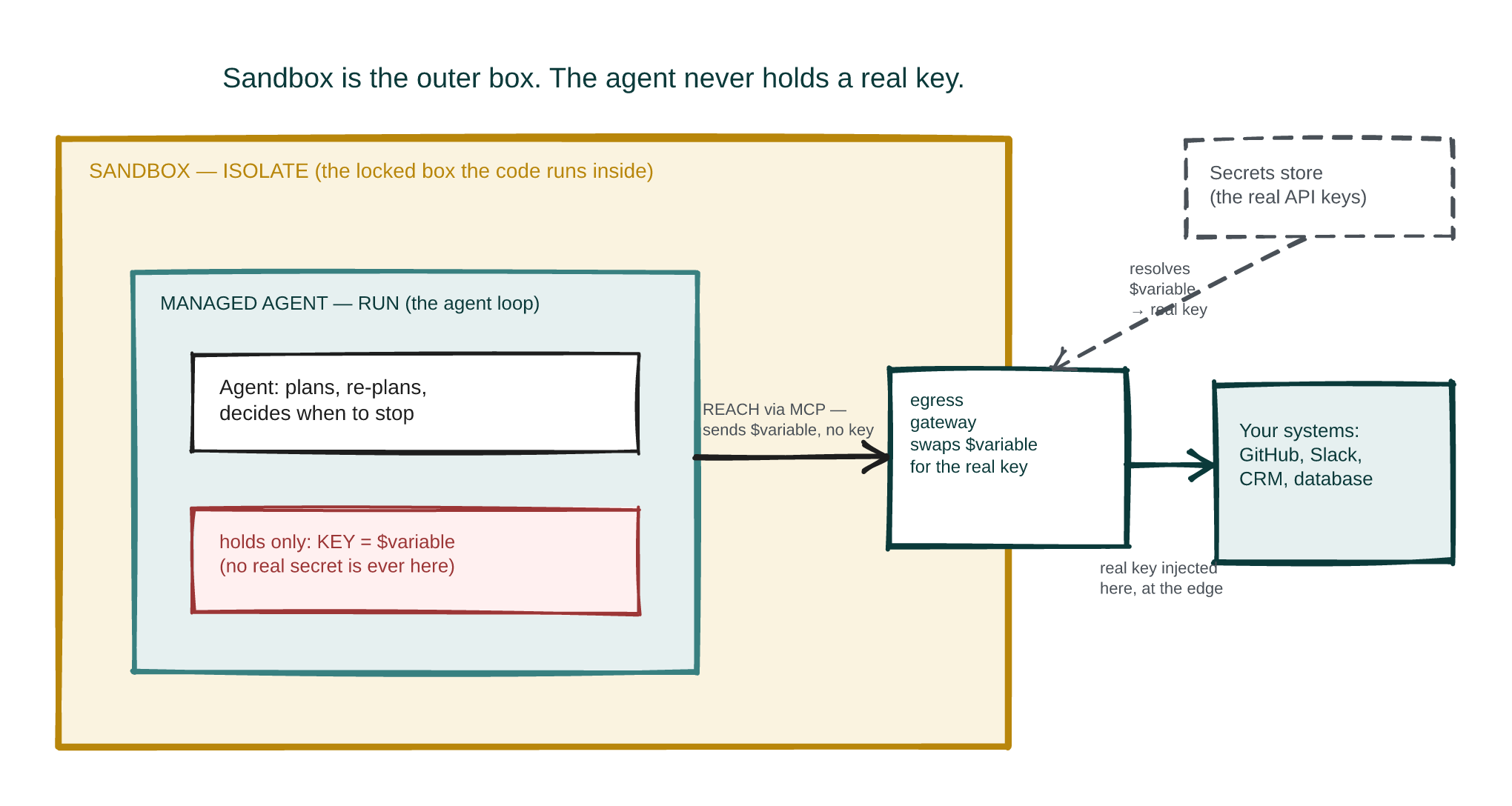 Diagram — the sandbox is the outer box. The managed agent runs inside it and holds only a placeholder for each secret; the gateway on the boundary resolves that placeholder to the real credential as the request leaves, and reaches your systems through MCP. The agent never sees a real key.
The companion piece takes the run and isolate layers in the same plain terms: whose managed-agent runtime to commission long work on, and what a sandbox actually buys you.
When an MCP earns its place, and when it doesn’t
Start with the cases where it clearly pays. An MCP server is worth building when you want your AI assistant to reach real company systems through one governed door: pulling context from a shared drive or wiki, acting in Slack or Jira or a CRM, and giving every team the same vetted toolset whichever AI application they use. At launch Anthropic shipped reference servers for Google Drive, Slack, GitHub, and Postgres and named Block and Apollo as early adopters, so the pattern is not theoretical.
What you gain is plain enough: one server per system instead of one integration per application, a model choice you keep, and a single governance seam for authentication, scoping, logging, and approvals. The ecosystem is moving your way too, as OpenAI, Google, and new systems increasingly arrive MCP-ready.
What it costs is where the Monday-to-Friday story starts, and pretending otherwise is how teams walk into it. Every tool is an attack surface and every permission a liability. The protocol ships no guardrails, so hosting, monitoring, audit, and rate limits land on your operations people. The specification is young and still moving. And in the wrong place it is pure overhead.
The decision, short enough to keep.
Reach for an MCP when: several AI applications must share one vetted toolset; the tools live across processes, machines, or a third party’s system; you want a single governed boundary for authentication and audit; or you want to keep your model choice open.
Don’t reach for one when: it is a single agent calling a couple of functions in one process; the task is a fixed, deterministic pipeline where nothing is left for a model to decide; or you cannot yet fund the guardrails the protocol assumes. If it is the last of these, fund the guardrails first, then connect.
Every failed rollout I have seen comes down to one missing sentence. Make your team say it out loud before they build. An MCP gives an AI safe reach to your tools. It does not give it judgment, a runtime, or a fence. Those you add, on purpose, before you switch it on.